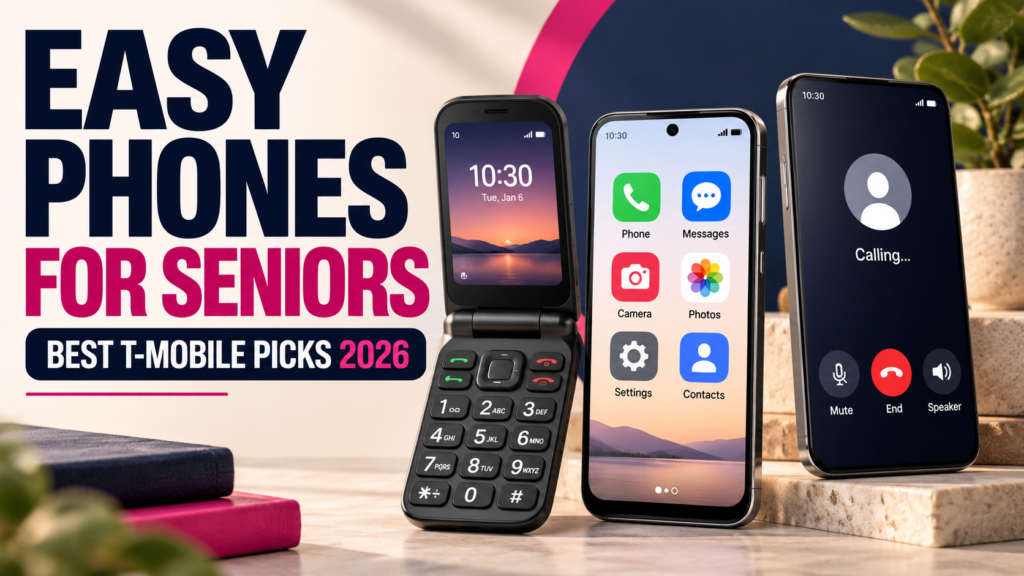
The best T-Mobile phones for seniors in 2026 include the TCL Flip 4 for straightforward calling, Samsung Galaxy A37 5G for a large touchscreen with Easy mode, Apple iPhone 17 for familiar iPhone features, and Google Pixel 10a for an affordable smartphone with Simple View. The Sonim XP3plus 5G is another option for people who prefer physical buttons and a rugged design.
But there is no single phone that is easiest for every older adult. Someone who mainly makes calls may prefer a flip phone, while someone who uses video calling, maps, photos, messaging apps and online banking may find a smartphone more useful.
Screen readability, button size, hearing-aid compatibility, voice clarity, charging convenience and the ability to customize the interface can matter more than camera megapixels or processor benchmarks.
This guide compares eight phones available through T-Mobile in 2026, explains their practical advantages and limitations, and shows how to make modern smartphones easier to use before deciding whether a replacement is necessary.
Quick picks: Best T-Mobile phones for seniors in 2026
- Best simple flip phone: TCL Flip 4 — physical buttons and basic calling.
- Best rugged flip phone: Sonim XP3plus 5G — durable construction and programmable emergency shortcut.
- Best Samsung smartphone: Galaxy A37 5G — large screen and Easy mode on supported software.
- Best iPhone: iPhone 17 — familiar iOS experience and Assistive Access.
- Best lower-cost iPhone: iPhone 17e — important iPhone accessibility features at a lower device tier.
- Best Google Android: Pixel 10a — Simple View and long software support.
- Best basic budget smartphone: Moto G (2026) — large display and battery at a lower price.
- Best large-screen budget alternative: T-Mobile REVVL 8 Pro — large AMOLED display and mainstream Android features.
Best starting point: Choose a flip phone if calls and basic texts are the main priorities. Choose an iPhone, Samsung or Pixel if you want video calls, photos, navigation and useful apps.
What Makes a T-Mobile Phone Easy to Use for Seniors?
A phone does not become easier to use simply because it is marketed toward older adults. What matters is how comfortably someone can perform the tasks they use most often.
The right features depend on personal preferences, familiarity with technology and any specific accessibility needs.
1. Readable text and clear displays
A larger screen can make messages, contact names, photographs and app controls easier to see.
However, screen size is only part of the equation. Adjustable text size, display scaling, high contrast and brightness also matter.
For example, a 6.7-inch smartphone with small default text may be less comfortable to read than a smaller phone configured with large fonts and clear icons.
Before purchasing, try reading an actual text message and a contact name at a comfortable viewing distance.
2. Buttons and controls that feel comfortable
Some people prefer physical keys because they can feel individual buttons while dialing.
Others prefer touchscreens because they can enlarge the on-screen controls, use voice commands and navigate with fewer physical button presses.
Neither approach is automatically easier for everyone.
3. Simple access to frequently used functions
Making calls, checking messages, finding contacts and taking photos should not require navigating through several confusing menus.
Modern smartphones can often be configured with a cleaner home screen and larger shortcuts.
A well-configured phone may be more useful than buying another device with unfamiliar menus.
4. Hearing and audio options
People using hearing aids or other hearing devices should investigate compatibility with the exact phone.
Check telephone-call clarity, speakerphone volume, Bluetooth connectivity and any supported hearing-device streaming features.
A hearing-aid compatibility designation is useful, but it does not establish that every hearing aid will connect or stream audio in the same way.
5. Comfortable charging and battery life
A phone that needs frequent charging or has a difficult-to-use charging connector can become inconvenient.
Large batteries, practical charging methods and visible charging indicators can make everyday ownership easier.
Do not judge battery life solely by the battery’s milliamp-hour rating. Actual endurance depends on software, network coverage, display settings and usage.
6. Familiar software and useful support
Someone who has used an iPhone for years may find another iPhone easier than switching to a basic flip phone with completely different menus.
Likewise, an existing Samsung user may prefer a newer Galaxy with familiar settings.
When choosing a phone, consider who will help with setup, whether the manufacturer provides clear instructions and how long the device receives security updates.
Best T-Mobile Phones for Seniors in 2026: Side-by-Side Comparison
The following table focuses on usability rather than technical specifications alone.
| Phone | Phone type | Main advantage | Important limitation | Best suited to |
|---|---|---|---|---|
| TCL Flip 4 | Flip phone | Large physical keys and simple calling controls | Limited smartphone app experience | Calling and basic messaging |
| Sonim XP3plus 5G | Rugged flip phone | Durability, tactile controls and programmable SOS button | Heavier and more expensive than basic flip phones | Physical controls and ruggedness |
| Samsung Galaxy A37 5G | Android smartphone | Large AMOLED display and Samsung accessibility settings | Touchscreen learning required | Everyday smartphone use |
| Apple iPhone 17 | iOS smartphone | Assistive Access and broad accessibility options | Higher purchase price | Existing or prospective iPhone users |
| Apple iPhone 17e | iOS smartphone | iPhone accessibility at a lower model tier | Fewer premium hardware features | Cost-conscious iPhone buyers |
| Google Pixel 10a | Android smartphone | Simple View and long software support | No physical dialing keypad | Simplified Android experience |
| Motorola Moto G (2026) | Budget Android | Large display, battery and lower handset price | Modest processing power | Budget smartphone basics |
| T-Mobile REVVL 8 Pro | Large-screen Android | 6.8-inch AMOLED display | Large device and less distinctive simplified interface | Reading and media on a larger screen |
Comparison based on official product documentation and manufacturer-supported accessibility features reviewed October 29, 2026. Recommendations represent use cases, not measured ease-of-use scores or hands-on testing conducted by PhonicSpecs.
Which category should you start with?
If you mainly need reliable calling and occasional text messages, begin with the TCL Flip 4.
If you want a smartphone but prefer a simplified screen, compare the Samsung Galaxy A37, iPhone 17 and Pixel 10a.
If price is your main consideration, review the Moto G (2026) and available carrier promotions before choosing.
Best T-Mobile Flip Phones for Seniors: Physical Buttons and Simple Calling
Flip phones can be a useful choice for people who prefer physical controls and primarily use their phones for voice calls and occasional messages.
They generally offer fewer apps and customization options than full smartphones, but that simpler approach can be an advantage when advanced features are unnecessary.
1. TCL Flip 4 — Best Simple T-Mobile Flip Phone
Best for: People who want physical number keys, straightforward calling and a compact phone that folds closed.
The TCL Flip 4 is one of the clearest choices for buyers who prefer a traditional mobile-phone design.
T-Mobile lists a 3.2-inch internal display and a 1.77-inch external display. The smaller outside screen can show basic information without opening the device.
The phone also includes a large tactile keypad, shortcut keys for frequently used functions and the ability to customize certain display settings.
Its physical keypad means users do not have to navigate a touchscreen simply to enter a telephone number.
What makes it easier to use?
- Physical number keys that can be felt while dialing.
- Dedicated navigation controls.
- A straightforward interface focused on essential tasks.
- Shortcut access to frequently used contacts and functions.
- Adjustable text, colors and brightness on the internal screen.
- Folded design that helps protect the keypad when not in use.
The TCL Flip 4 also supports 4G LTE and 5G and includes a 3,000mAh battery.
Those capabilities make it more modern than older basic phones that relied on discontinued cellular technologies.
What are the limitations?
The TCL Flip 4 is not a full replacement for a modern touchscreen smartphone.
Its smaller display, keypad-based text entry and limited app environment are less convenient for video calls, detailed maps, online forms and some modern messaging applications.
Typing a long message using number keys may also be slower than using an on-screen smartphone keyboard.
Price context: T-Mobile listed the TCL Flip 4 at a full retail price of approximately $119.99 during the October 2026 research. Promotions and checkout prices can change.
Our assessment: A strong first option for someone who values uncomplicated calling over advanced smartphone functionality.
View the TCL Flip 4 specifications on T-Mobile.
2. Sonim XP3plus 5G — Best Rugged Flip Phone
Best for: People who prefer tactile controls and want a phone designed to withstand demanding physical environments.
The Sonim XP3plus 5G takes a different approach from the lightweight basic flip phone.
It combines a physical keypad with a rugged exterior, a 2.95-inch internal display and programmable hardware buttons.
T-Mobile identifies IP68 protection and MIL-STD-810H-related ruggedness specifications for the device.
It also includes programmable Push-to-Talk and SOS controls, which may be useful when configured appropriately.
What makes it worth considering?
- Physical number and navigation keys.
- Rugged construction intended for tougher environments.
- Programmable shortcut and SOS hardware buttons.
- A removable 3,000mAh battery.
- 4G LTE and 5G support.
- A design emphasizing voice communication.
Its rugged construction may appeal to someone who frequently spends time outdoors or wants a more protected device.
What are the compromises?
The XP3plus 5G is bulkier and heavier than many ordinary flip phones.
Its additional features and rugged construction also make it more expensive than the TCL Flip 4.
Furthermore, a programmable SOS button does not automatically guarantee that help will be contacted without prior setup. Its actual behavior should be verified according to the device and service instructions.
Price context: T-Mobile’s public catalog listed a full retail price of approximately $269.99 during the research period.
Our assessment: Consider this phone when durability and physical controls matter enough to justify the extra size and price. For uncomplicated calls at a lower price, the TCL Flip 4 may be more appropriate.
Best Easy-to-Use T-Mobile Smartphones for Seniors
Smartphones provide access to video calling, navigation, photographs, email, banking, messaging apps and accessibility tools that basic flip phones may not support.
The key is finding a smartphone that feels manageable rather than unnecessarily complicated.
3. Samsung Galaxy A37 5G — Best Easy-to-Customize Samsung Phone
Best for: People who want a large Android touchscreen and a more straightforward interface without paying flagship prices.
The Samsung Galaxy A37 5G offers a 6.7-inch Super AMOLED display, making it a relevant option for users who prefer larger on-screen text and controls.
Samsung also offers Easy mode on supported Galaxy devices. This feature can enlarge on-screen elements, increase keyboard contrast and help reduce accidental long-press interactions.
That combination of a large screen and customizable software is the main reason to consider the A37.
Why might it be easier to use?
- Large screen for viewing messages and photographs.
- Adjustable text and display size.
- Samsung Easy mode on supported software configurations.
- Voice commands and built-in Android accessibility features.
- Access to video calling, maps and popular communication apps.
- Samsung’s published six-year security update policy.
One practical benefit is that the phone can be used in normal Android mode or simplified through settings, depending on the person’s preferences.
What are the limitations?
A large screen does not eliminate the need to learn touchscreen navigation.
The A37 may still feel complicated to someone who has never used a smartphone, especially if many notifications, apps and accounts are added during setup.
Its 6.7-inch screen also means the phone is physically larger than a compact handset.
Our assessment: A useful Samsung choice for someone who wants an accessible mainstream smartphone and is comfortable learning basic touch controls.
Explore the Galaxy A37 5G on PhonicSpecs and T-Mobile’s official listing.
4. Apple iPhone 17 — Best iPhone for Familiarity and Accessibility
Best for: Existing iPhone users, people who prefer Apple’s interface, and buyers who want extensive accessibility customization.
The iPhone 17 has a 6.3-inch OLED display with ProMotion technology, a capable camera system and the familiar iOS interface.
Its most relevant strength for this guide is not processing speed. It is the range of features available to make the phone easier to see, hear and navigate.
Apple offers text scaling, display adjustments, VoiceOver, Magnifier, voice control and Assistive Access on supported iPhones.
What is Assistive Access?
Assistive Access provides a simplified iPhone experience with larger on-screen elements and more focused app interfaces.
It was designed as an accessibility feature for people with cognitive disabilities, but it may also be appropriate for others who prefer a simplified experience.
For example, someone can set up a focused home screen with prominent access to calls, messages, photographs and selected other apps.
A trusted supporter can help configure it when assistance is wanted, although the person using the phone should retain control over their own device and account.
Why consider the iPhone 17?
- Assistive Access for a more focused interface.
- Adjustable text, display contrast and accessibility controls.
- Voice-based interaction options.
- Convenient video calls and photo sharing.
- Familiar iOS navigation for existing iPhone users.
- Access to Apple’s accessibility support documentation.
What should buyers consider?
The iPhone 17 costs substantially more than a basic flip phone or entry-level Android device.
It is also a touchscreen smartphone, so someone who strongly prefers physical buttons may not find it more comfortable.
U.S.-market iPhone 17 models use eSIM, meaning a traditional physical SIM transfer is not the activation method for those versions.
Our assessment: Particularly worth considering for someone already familiar with iPhones, or someone who wants a full smartphone with strong accessibility customization.
Review the iPhone 17 specifications on PhonicSpecs and Apple’s Assistive Access instructions.
5. Apple iPhone 17e — Best Lower-Cost iPhone Option
Best for: Buyers who want iPhone accessibility features without paying for all the hardware features of a premium model.
The iPhone 17e belongs to Apple’s more affordable iPhone lineup.
For everyday communication, the difference between an entry-level iPhone and a premium Pro model may matter less than having a comfortable screen, understandable controls and reliable access to important apps.
The iPhone 17e supports Apple’s broader iOS accessibility ecosystem, including Assistive Access on compatible software.
Advantages
- Familiar iPhone interface.
- Assistive Access and adjustable display settings.
- Voice commands and accessibility tools.
- Useful communication, camera and navigation apps.
- Lower product tier than Apple’s premium iPhones.
Limitations
The 17e does not include all the advanced display or camera features available on more expensive iPhones.
Its 60Hz display, for example, is less fluid than the 120Hz ProMotion display found on the standard iPhone 17.
However, a higher refresh rate is not necessarily a priority for someone mainly using calls, text messages, photos and basic apps.
Our assessment: Compare the 17e against the standard iPhone 17 using the actual current prices. A sufficiently discounted iPhone 17 may offer better value, while the 17e may be the sensible choice when cost matters more than premium features.
Review the iPhone 17e on T-Mobile.
6. Google Pixel 10a — Best Simplified Android Experience
Best for: People who want Google’s Android interface, larger navigation elements and long software support.
The Pixel 10a combines a 6.3-inch OLED display with Google’s Simple View accessibility feature.
Simple View is particularly relevant because it changes several interface settings together rather than requiring the user to adjust every option individually.
What does Pixel Simple View change?
According to Google’s documentation, enabling Simple View through the phone’s settings can provide:
- Larger text and app icons.
- A simplified home screen.
- Simplified three-button navigation.
- Higher touch sensitivity.
When enabled during the initial setup process, Google also documents additional preset changes and shortcuts.
This can help make essential controls more noticeable and navigation more predictable for someone who prefers clear buttons rather than gestures.
The Pixel 10a also has a published seven-year update policy, which is relevant to buyers planning to keep their phones for several years.
What are the compromises?
Simple View cannot eliminate every complicated app or online service.
Third-party apps may still have their own menus, account requirements and accessibility limitations.
And although the Pixel 10a is less expensive than Google’s flagship phones, it costs more than some entry-level Motorola devices.
Our assessment: One of the most interesting Android choices for someone wanting an easy-to-adjust interface without giving up a full smartphone.
See T-Mobile’s Pixel 10a listing and Google’s Simple View guide.
7. Motorola Moto G (2026) — Best Low-Cost Smartphone for Essentials
Best for: Buyers looking for an inexpensive phone with a large touchscreen for everyday communication.
The Moto G (2026) includes a 6.7-inch display, a 5,200mAh battery and 5G connectivity.
Its relatively low handset price makes it an alternative to premium iPhones and Galaxy devices.
Motorola also offers Android accessibility settings, including adjustable text and display size, screen magnification and other built-in accessibility tools.
What makes it useful?
- Large 6.7-inch touchscreen.
- Substantial battery capacity.
- Access to calling, messaging, maps and video-call apps.
- Android text and display customization.
- Lower purchase price than many midrange and flagship phones.
For someone wanting to use a few essential apps, a phone like this may provide enough functionality without unnecessary flagship spending.
What are the trade-offs?
The Moto G (2026) is an entry-level smartphone.
Its processing power, memory and display sharpness are more modest than those of midrange phones such as the Pixel 10a or Galaxy A37.
It also does not offer the same dedicated simplified-interface experience as Pixel Simple View or iPhone Assistive Access.
Price context: T-Mobile listed the Moto G (2026) at approximately $229.99 full retail during the research period.
Our assessment: A sensible choice when budget is a major concern and the person primarily uses basic smartphone features.
See the Moto G (2026) specifications on PhonicSpecs.
8. T-Mobile REVVL 8 Pro — Best Large-Screen Budget Alternative
Best for: Buyers who want a large smartphone display and mainstream Android functionality without moving into the premium flagship category.
The REVVL 8 Pro features a 6.8-inch Full HD+ AMOLED display, a 5,000mAh battery and a Snapdragon 6 Gen 3 processor.
Its large screen is the main reason to investigate it for this guide.
When text and display scaling are adjusted appropriately, a larger screen can provide more room for readable messages, app controls and photographs.
The phone also supports 5G and includes wireless charging capability.
Advantages
- Large 6.8-inch AMOLED display.
- Adjustable Android text and display settings.
- 5,000mAh battery capacity.
- Modern connectivity and mainstream smartphone apps.
- Additional screen space for reading and watching videos.
Limitations
The large screen also means a larger handset, which may feel less comfortable to hold with one hand.
The REVVL 8 Pro is not a dedicated simplified phone. It relies on conventional Android accessibility settings rather than a uniquely designed senior-phone interface.
It is therefore important to compare how its controls feel against Samsung Easy mode and Pixel Simple View.
Our assessment: Worth investigating if screen size is the main priority, but do not choose it solely because its display is larger than the alternatives.
How to Make an iPhone, Samsung Galaxy or Google Pixel Easier to Use
Buying a new phone is not always necessary. Many modern smartphones already have built-in accessibility features that can simplify navigation considerably.
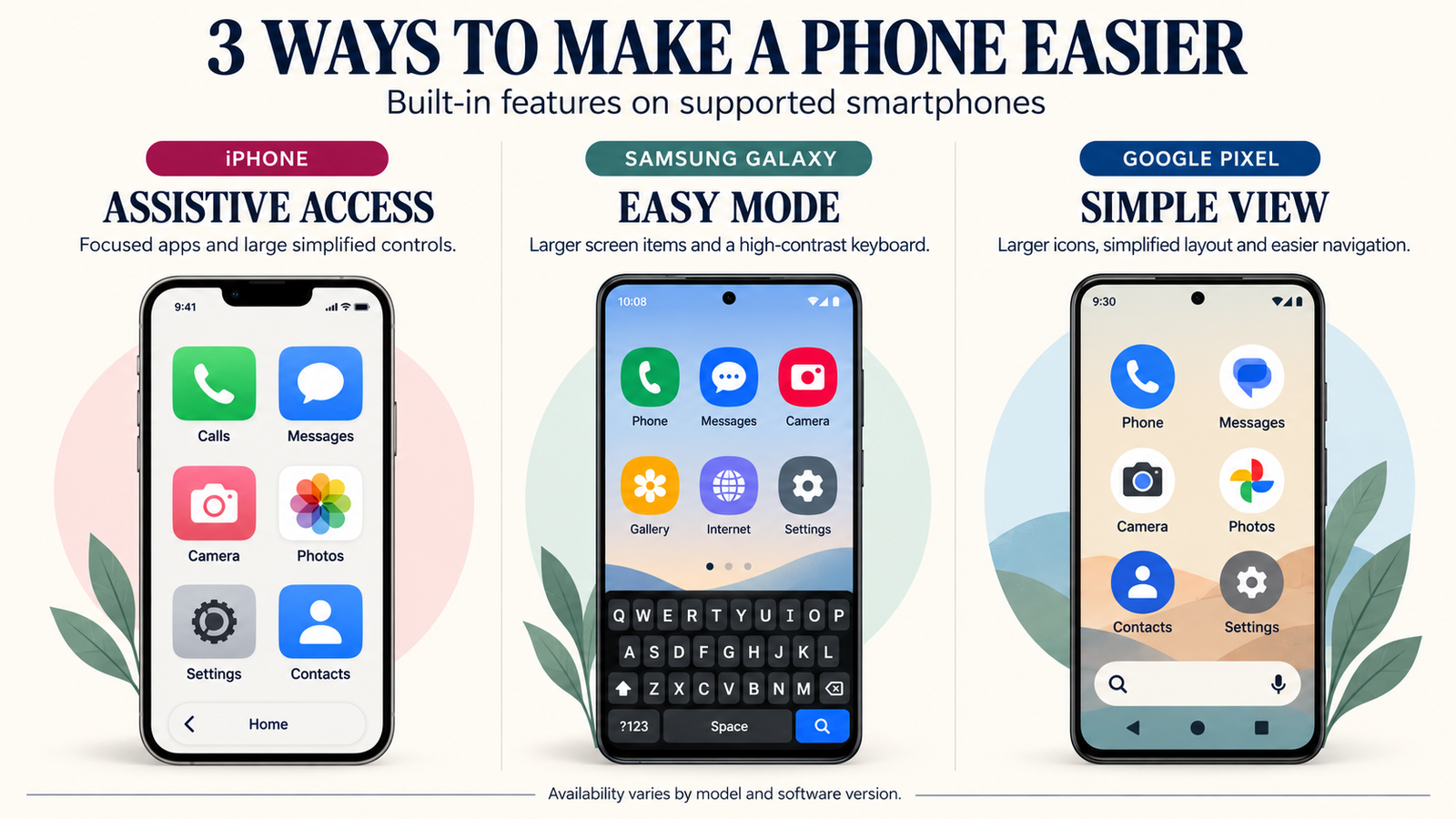
Three particularly useful options are Apple’s Assistive Access, Samsung Easy mode and Google Pixel Simple View.
How to enable Assistive Access on iPhone
Apple’s Assistive Access provides larger interface elements and focused app experiences.
- Open Settings on the iPhone.
- Select Accessibility.
- Tap Assistive Access.
- Choose Set Up Assistive Access.
- Follow the setup process and select a suitable layout.
- Choose which apps should appear.
- Complete the required security setup and learn how to exit Assistive Access.
Apple offers grid and row layouts, along with specially designed experiences for certain essential applications.
However, not every iPhone app is redesigned for Assistive Access. Some apps retain their original interface.
For complete setup details, see Apple’s official Assistive Access guide.
How to enable Easy mode on Samsung Galaxy
On supported Galaxy software, Easy mode enlarges on-screen items and provides additional interface adjustments.
- Open Settings.
- Tap Display.
- Select Easy mode.
- Turn Easy mode on.
- Adjust available options, such as the touch-and-hold delay or high-contrast keyboard.
Samsung’s documentation explains that Easy mode can enlarge screen items and reduce accidental touches associated with long-press interactions.
The precise menu and available options can vary by Galaxy model and software version.
See Samsung’s official display settings guide for additional instructions.
How to enable Simple View on Google Pixel
Google’s Simple View changes several accessibility-related settings together.
- Open Settings on a supported Pixel.
- Select Accessibility.
- Find Simple View under Quick Access.
- Turn on Use Simple View.
- Review the new layout and adjust additional display settings as needed.
Google documents larger text and icons, simplified navigation, a cleaner home screen and increased touch sensitivity among the changes.
During initial device setup, the available Simple View preset may include additional shortcuts and layout settings.
For official instructions, see Google’s Simple View help page.
These features can make a familiar smartphone significantly easier to use without replacing it with a basic phone.
Other useful accessibility adjustments
Whether you use iOS or Android, consider customizing the phone around the functions used most often.
- Increase text size and display scaling.
- Choose a high-contrast wallpaper and readable theme.
- Place favorite contacts on the home screen where supported.
- Remove or hide unnecessary app shortcuts.
- Set a comfortable ringtone and call volume.
- Enable voice-based controls if preferred.
- Use three-button navigation instead of gestures where available.
- Reduce unnecessary notifications and interruptions.
Make changes gradually and let the person using the phone decide what feels comfortable. An overly simplified setup can be just as inconvenient as an overly complicated one if it hides useful functions.
Flip Phone vs. Smartphone: Which Is Better for an Older Adult?
Neither type is universally better. The right choice depends on what the person actually wants to do.
| Everyday need | Flip phone | Smartphone |
|---|---|---|
| Dialing numbers | Physical numeric buttons | On-screen keypad or voice controls |
| Reading messages | Smaller display and keypad navigation | Adjustable large text on a bigger screen |
| Video calls | Limited or unavailable depending on model | Broad support through compatible apps |
| Navigation and maps | Limited application experience | Full mapping and navigation apps |
| Photos | Usually basic camera hardware | More capable cameras and larger photo displays |
| Accessibility customization | Physical controls and selected display adjustments | Text scaling, screen readers, simplified layouts and more |
| Learning requirements | May be easier for someone accustomed to physical keys | May be easier for someone already familiar with smartphone apps |
When a flip phone may be the better choice
Consider a flip phone when the primary needs are answering calls, making calls, sending occasional short messages and carrying a compact device.
The TCL Flip 4 is a useful starting point for this situation.
When a smartphone may be the better choice
Consider a smartphone when the person wants video calls, photographs, location sharing, maps, email, messaging apps and other services.
These functions can be valuable for communication, daily activities and independence.
Modern simplified modes can reduce complexity while keeping the full range of smartphone features available.
Should you replace an existing phone?
Not necessarily.
If someone already uses a phone comfortably and the device remains supported, adjusting its accessibility settings may be more useful than buying something unfamiliar.
A replacement makes more sense when the existing phone has major battery problems, lacks essential network support, no longer receives important security updates or cannot meet the person’s needs.
Best T-Mobile Phones for Hearing Aids, Large Text and Accessibility
Accessibility needs vary widely. Instead of assuming one phone suits everyone, investigate the specific features that matter to the person using it.
Hearing-aid compatibility: what should you check?
T-Mobile publishes hearing-aid compatibility information for supported devices, including several models discussed in this guide.
For example, its published documentation identifies hearing-aid compatibility information for the TCL Flip 4, Sonim XP3plus 5G, Pixel 10a, Moto G (2026) and selected Apple and Samsung devices.
However, different hearing devices use different connectivity technologies.
Check whether the phone and hearing device support the same method, such as appropriate acoustic coupling, telecoil functionality or a compatible Bluetooth streaming protocol.
A hearing-aid compatibility pass is not a guarantee of direct Bluetooth audio streaming to every hearing aid.
Whenever possible, test a call using the actual hearing device before purchasing.
You can review T-Mobile’s published hearing-aid compatibility information and check the exact phone model.
Which phones are easier to read?
A larger, bright display can be helpful, but adjustable text size and contrast are equally important.
The Galaxy A37 and REVVL 8 Pro provide large displays. The iPhone 17 and Pixel 10a offer smaller overall devices with extensive display customization.
When comparing them, read a message and open the phone’s contacts list with the text size you would actually use.
Which phones have the easiest buttons?
The TCL Flip 4 and Sonim XP3plus 5G provide physical keypads.
However, the size and spacing of buttons differ, so hands-on comfort is important.
For touchscreens, increasing touch-target size, using clear navigation buttons and adjusting touch sensitivity can help.
What about voice commands?
Modern iPhones and Android phones offer voice-based options for certain tasks.
Depending on the model, software and settings, these may include making calls, sending messages, opening apps, dictating text or controlling accessibility functions.
Voice tools can be convenient, but they may require internet connectivity or additional setup for particular functions.
They should be treated as useful alternatives to manual controls, not as guaranteed replacements for every task.
Emergency Calling, SOS Buttons and Other Safety Features
Some phone buyers prioritize quick communication during emergencies. In that situation, ease of access and correct setup matter more than the number of features advertised.
Physical emergency shortcut buttons
The Sonim XP3plus 5G includes a programmable SOS button.
However, the button must be configured for its intended behavior. It should not be assumed to automatically contact emergency services unless that specific function is documented and enabled.
Emergency features on iPhone
Supported iPhones include emergency-related features such as Emergency SOS, alongside additional safety capabilities that depend on the model, location and service availability.
Learn the correct activation steps in advance rather than assuming every iPhone behaves identically.
Emergency features on Android
Many Android smartphones provide emergency information and safety functions through their settings.
The actual options can differ among Samsung, Google, Motorola and T-Mobile-branded phones.
Review the manufacturer’s instructions and confirm that emergency contacts and any available features are configured correctly.
Can emergency calling work without an active plan?
U.S. wireless phones may be able to call 911 even without an active service subscription when a compatible network is available.
However, coverage and device limitations still apply, and a phone without active service may not provide reliable callback or location capabilities.
For everyday communication and dependable service, use a properly activated phone with suitable network coverage.
No smartphone should be presented as a substitute for dedicated medical monitoring or emergency-response services where those are needed.
Does T-Mobile Have Special Phone Plans for Seniors?
Yes. T-Mobile offers discounted wireless plans for eligible customers aged 55 and older.
However, a discounted phone plan is separate from choosing an easy-to-use handset.
Someone can potentially use a flip phone or smartphone with a suitable plan, subject to the plan’s device and service requirements.
Who qualifies for T-Mobile 55+ plans?
T-Mobile states that customers aged 55 or older can qualify for its age-based plan offerings.
For the referenced 55+ savings plans, the primary account holder must meet the age requirement and provide proof when requested.
Other people on the account do not necessarily need to be 55 or older.
What is Essentials Choice 55 2.0?
Essentials Choice 55 2.0 is an age-based plan option for eligible customers needing one or two lines.
During October 2026 research, T-Mobile advertised two-line pricing beginning at $30 per line per month with the qualifying AutoPay discount, excluding applicable additional taxes and fees.
That advertised amount is for the specified two-line arrangement, not a universal $30 price for every customer.
The total cost may differ based on line count, payment method, taxes and any applicable promotions.
Should you choose a premium 55+ plan?
T-Mobile also offers more feature-rich 55+ plans with additional benefits.
Those can be relevant for people using substantial data, traveling or needing features not included in a less expensive option.
However, someone using a basic flip phone for calls and occasional messages may not need the benefits of a premium plan.
The most sensible approach is to match the plan to actual usage instead of choosing the most expensive package automatically.
What about promotional phone offers?
Some T-Mobile offers provide discounted devices through monthly bill credits, qualifying plans, trade-ins or new-line requirements.
A phone advertised as free may still have an installment agreement and conditions affecting the total cost.
Before accepting an offer, compare the device’s full retail price, monthly plan cost, financing duration and any restrictions on promotional credits.
For current prices and eligibility, visit T-Mobile’s official 55+ plans page.
What to Check Before Buying a T-Mobile Phone for an Older Adult
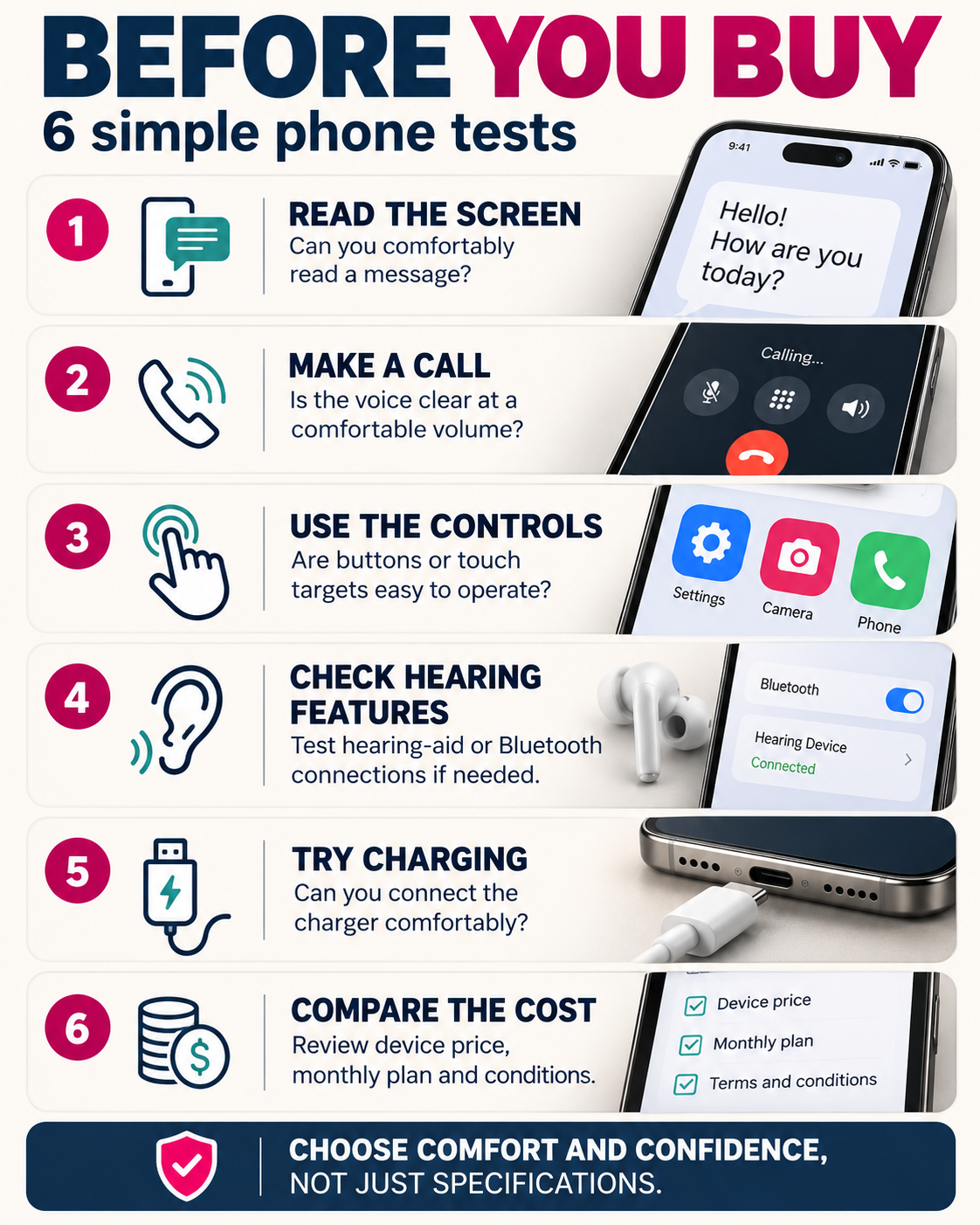
The easiest way to evaluate a phone is to test a few common tasks instead of relying only on advertising or specifications.
Test 1: Read a real text message
Open a message using the intended text size.
Can the person read it comfortably without repeatedly zooming in or changing their grip?
Try adjusting display size, font weight and contrast before deciding that a larger phone is necessary.
Test 2: Make and receive a call
Check how easily the person can answer an incoming call, find a favorite contact and adjust the call volume.
If hearing aids are used, test the actual hearing device connection if possible.
Test 3: Navigate the main controls
Ask the person to return to the home screen, open the contact list and find the messaging app.
On a flip phone, evaluate the keypad and navigation buttons. On a smartphone, evaluate the size and position of touch targets.
Test 4: Take and view a photo
If photography matters, check whether taking a photo and finding it afterward feels straightforward.
This often reveals differences in app navigation that do not appear in a specification table.
Test 5: Connect the charger
Try plugging in the charging cable and check whether the charging indicator is visible.
Consider whether a compatible wireless charger or charging stand might make routine charging more convenient.
Test 6: Compare the actual cost
Review the full handset price and the monthly wireless plan separately.
Also check activation fees, trade-in requirements, installment terms, warranties and return policies.
A lower monthly payment does not necessarily mean a lower total cost.
A few minutes testing everyday tasks can reveal more about comfort and ease of use than a long specifications sheet.
Questions to ask before buying
- What does the person actually want to do with the phone?
- Would physical keys or a touchscreen be more comfortable?
- Is the screen readable after increasing text size?
- Can the person easily answer and make calls?
- Are required hearing devices compatible?
- Is the phone comfortable to hold and carry?
- Will someone be available to help with initial setup if requested?
- Does the phone receive appropriate software updates?
- What is the full cost of the phone and service?
- Can the device be returned if it does not suit the user?
If possible, involve the person who will use the phone in the final choice rather than deciding based solely on assumptions about age.
Which T-Mobile Phone Should You Choose for Different Needs?
The following recommendations match common priorities to the phones examined in this guide.
| Main priority | Phone to investigate | Reason |
|---|---|---|
| Simple voice calls | TCL Flip 4 | Physical keys and straightforward interface |
| Rugged phone with physical keys | Sonim XP3plus 5G | Protected design and programmable controls |
| Large screen and Samsung interface | Galaxy A37 5G | AMOLED display and supported Easy mode |
| Familiar iPhone experience | iPhone 17 | iOS and extensive accessibility settings |
| Lower-cost iPhone | iPhone 17e | Core iPhone accessibility without Pro features |
| Simplified Android navigation | Pixel 10a | Simple View and larger navigation controls |
| Low-cost smartphone | Moto G (2026) | Affordable Android and large battery |
| Large screen for reading | REVVL 8 Pro | 6.8-inch AMOLED display |
What if the person already knows how to use an iPhone?
Consider staying with an iPhone rather than changing operating systems unnecessarily.
Familiarity can be more valuable than switching to a device marketed as simpler.
What if they mainly need calls?
Start with the TCL Flip 4 and compare it against the Sonim XP3plus 5G if ruggedness is important.
What if they want WhatsApp, video calls and maps?
A modern smartphone is generally a more suitable choice than a basic keypad phone.
Compare the Pixel 10a, Galaxy A37 and iPhone 17 based on preferred software and accessibility settings.
What if the budget is limited?
Compare the Moto G (2026), Galaxy A37 offers and available refurbished or unlocked phones.
Do not assume a refurbished premium phone is always better than a new budget model. Condition, warranty and remaining software support matter.
Should you buy the newest flagship?
Not unless its features provide a meaningful benefit.
Premium camera systems, the fastest processors and advanced gaming hardware often do little to improve ordinary calling or simple messaging.
For broader choices, read our Best T-Mobile Phones in 2026 guide.
You can also use the PhonicSpecs Phone Finder and phone comparison tool to investigate available smartphone specifications.
Frequently Asked Questions About T-Mobile Phones for Seniors
What is the easiest T-Mobile phone for a senior?
The TCL Flip 4 is a strong option for someone who mainly needs calls and basic messages and prefers physical buttons. For a smartphone, Samsung Easy mode, iPhone Assistive Access and Google Pixel Simple View can make supported devices easier to navigate.
Does T-Mobile have flip phones with big buttons?
Yes. T-Mobile offers phones such as the TCL Flip 4 with a tactile keypad and the rugged Sonim XP3plus 5G. Button size, spacing and comfort should be evaluated on the actual device before buying.
Does T-Mobile offer special phones only for seniors?
T-Mobile sells general-purpose phones with features that may be useful to older adults. These include flip phones with physical buttons and smartphones with accessibility settings. A phone does not need to be exclusively marketed to seniors to be easy to use.
Which is easier for seniors, iPhone or Android?
Neither is universally easier. iPhone offers Assistive Access, Samsung provides Easy mode on supported Galaxy devices, and Google Pixel offers Simple View. Familiarity with the operating system and the preferred layout are often more important than the brand.
Can Samsung phones be made easier to use?
Yes. Supported Galaxy devices offer Easy mode through Settings > Display > Easy mode. It can enlarge on-screen elements and provide options such as a high-contrast keyboard. Availability and controls can vary by model and software version.
What is the best T-Mobile phone for someone who uses hearing aids?
The best choice depends on the particular hearing device and the phone’s supported connectivity methods. T-Mobile publishes hearing-aid compatibility information for several phones, but Bluetooth streaming and other functions should be checked with the actual hearing aid before purchasing.
Does T-Mobile have discounted plans for people over 55?
Yes. T-Mobile offers eligible 55+ plan options, including Essentials Choice 55 2.0 and more feature-rich alternatives. The primary account holder must meet the age requirement and provide proof where required. Check current plan pricing and terms directly with T-Mobile.
Can a senior use a regular smartphone with bigger text?
Yes. Most modern iPhones and Android smartphones allow text enlargement and other display adjustments. Some also offer simplified interfaces such as Assistive Access, Easy mode or Simple View.
Is a flip phone better than a smartphone for older adults?
A flip phone may be more convenient when the primary tasks are calling and occasional texts. A smartphone is generally more capable for video calls, maps, photographs, banking and messaging apps. The better choice depends on what the individual wants to use.
What is the cheapest easy-to-use T-Mobile phone?
The TCL Flip 4 is one of T-Mobile’s lower-priced basic phones, while the Moto G (2026) is a relatively affordable smartphone. Actual prices and promotions change, so compare current full retail prices and service requirements.
Do T-Mobile senior phones support 5G?
Several phones discussed here support 5G, including the TCL Flip 4, Sonim XP3plus 5G and modern smartphones. However, a 5G label does not guarantee identical coverage everywhere. Verify the specific device and local service.
Does a bigger screen automatically make a phone easier?
No. Large displays can improve readability, but device weight, grip, text scaling and touchscreen layout also affect comfort. Test a phone with the preferred font and display settings before deciding.
Can I keep my current phone when switching to T-Mobile?
Possibly. The phone must be compatible with T-Mobile’s network, unlocked if necessary and eligible for activation. Use T-Mobile’s official IMEI checker to investigate the actual device.
Are emergency SOS features automatic?
Not necessarily. Emergency functions vary by device, service and configuration. Some require setup, while others have particular activation steps or coverage limitations. Review the manufacturer’s official instructions before relying on a feature.
What if an older adult is already comfortable with their current phone?
There may be no reason to replace it immediately. Check whether it still receives suitable software support, works on the required network and meets the person’s everyday needs. Adjusting text size or simplifying the interface may be enough.
Final Verdict: What Is the Best T-Mobile Phone for Seniors in 2026?
For simple calling and physical buttons, the TCL Flip 4 is our strongest starting recommendation. It offers a tactile keypad, straightforward interface and modern cellular connectivity without requiring a full touchscreen smartphone experience.
For someone who wants a rugged phone with physical controls, the Sonim XP3plus 5G is worth comparing, especially when its added durability is useful.
Among smartphones, the Samsung Galaxy A37 5G is attractive for its large screen and accessibility options, while the Google Pixel 10a stands out for Simple View and long software support.
The iPhone 17 and iPhone 17e are relevant choices for people who prefer Apple’s interface and accessibility tools, particularly those already familiar with iPhones.
For buyers with a limited budget, the Motorola Moto G (2026) offers the essentials at a lower device price, while the REVVL 8 Pro may suit someone who values a large AMOLED display.
Before buying, test the controls, text readability, calling clarity and charging process. If hearing devices are used, verify the exact compatibility rather than relying only on general phone specifications.
Then compare the full phone price and the wireless plan, including any applicable T-Mobile 55+ discounts.
Explore PhonicSpecs Phone Finder to compare more smartphones, or read our Best T-Mobile Phones 2026 guide for a broader selection.
The right phone is one that the person using it finds comfortable, understandable and useful—not necessarily the newest or most expensive model.
Sources and Verification
This article was prepared using carrier documentation, manufacturer accessibility instructions and official product specifications reviewed October 29, 2026.
T-Mobile device information
- T-Mobile — Best Cell Phones for Seniors in 2026
- T-Mobile — TCL Flip 4 Specifications
- T-Mobile — Sonim XP3plus 5G Specifications
- T-Mobile — Samsung Galaxy A37 5G
- T-Mobile — Apple iPhone 17
- T-Mobile — Apple iPhone 17e
- T-Mobile — Google Pixel 10a
- T-Mobile — Motorola Moto G (2026)
- T-Mobile — REVVL 8 Pro
Manufacturer accessibility documentation
- Apple — Set Up Assistive Access on iPhone
- Samsung — Adjust Galaxy Display Settings and Easy Mode
- Google — Use Simple View on Pixel
Carrier plans and compatibility
- T-Mobile — 55+ Discounted Wireless Plans
- T-Mobile — Hearing Aid Compatible Phone Information
- T-Mobile — Bring Your Own Phone and IMEI Checker